
Cohd Learning Portal Reminders
Optional text messages for people taking part in Cohd leadership programs
What you get
Cohd can text you reminders about your upcoming team practice sessions and about weekly assignments you have not yet completed, at the times you choose in your portal settings. Message frequency varies with your settings, and is typically no more than 2 messages per week for each program you are enrolled in. Message and data rates may apply.
How to opt in
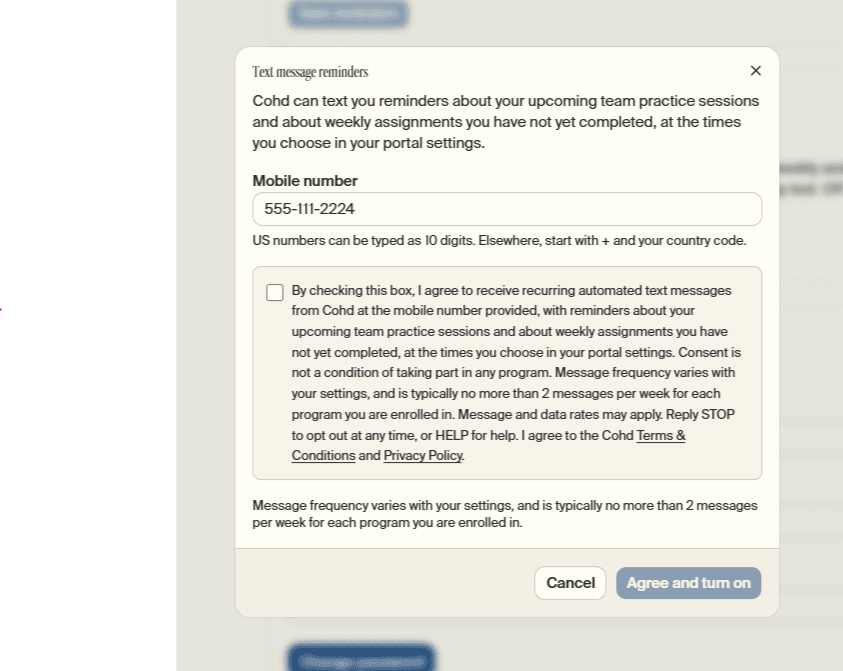
Text messages are off unless you turn them on. Participants sign in to the Cohd learning portal at portal.cohd.co, open Settings → Text messages, select Turn on text messages, enter their mobile number and tick the consent box below. The box is never ticked in advance, and nothing is saved until it is ticked. This is the form they see:
Text message reminders
Cohd can text you reminders about your upcoming team practice sessions and about weekly assignments you have not yet completed, at the times you choose in your portal settings.
Message frequency varies with your settings, and is typically no more than 2 messages per week for each program you are enrolled in.
After opting in, they receive a text confirming they are signed up for Cohd Learning Portal Reminders, with how to get help and how to stop.
Stopping and help
- Reply STOP to any message to stop receiving texts, or turn them off in Settings at any time.
- Reply HELP for help, or email hello@cohd.co.
- Consent is not a condition of taking part in any program.
See the Terms & Conditions and Privacy Policy. We do not sell or share your SMS opt-in data or personal information with third parties for marketing purposes.